
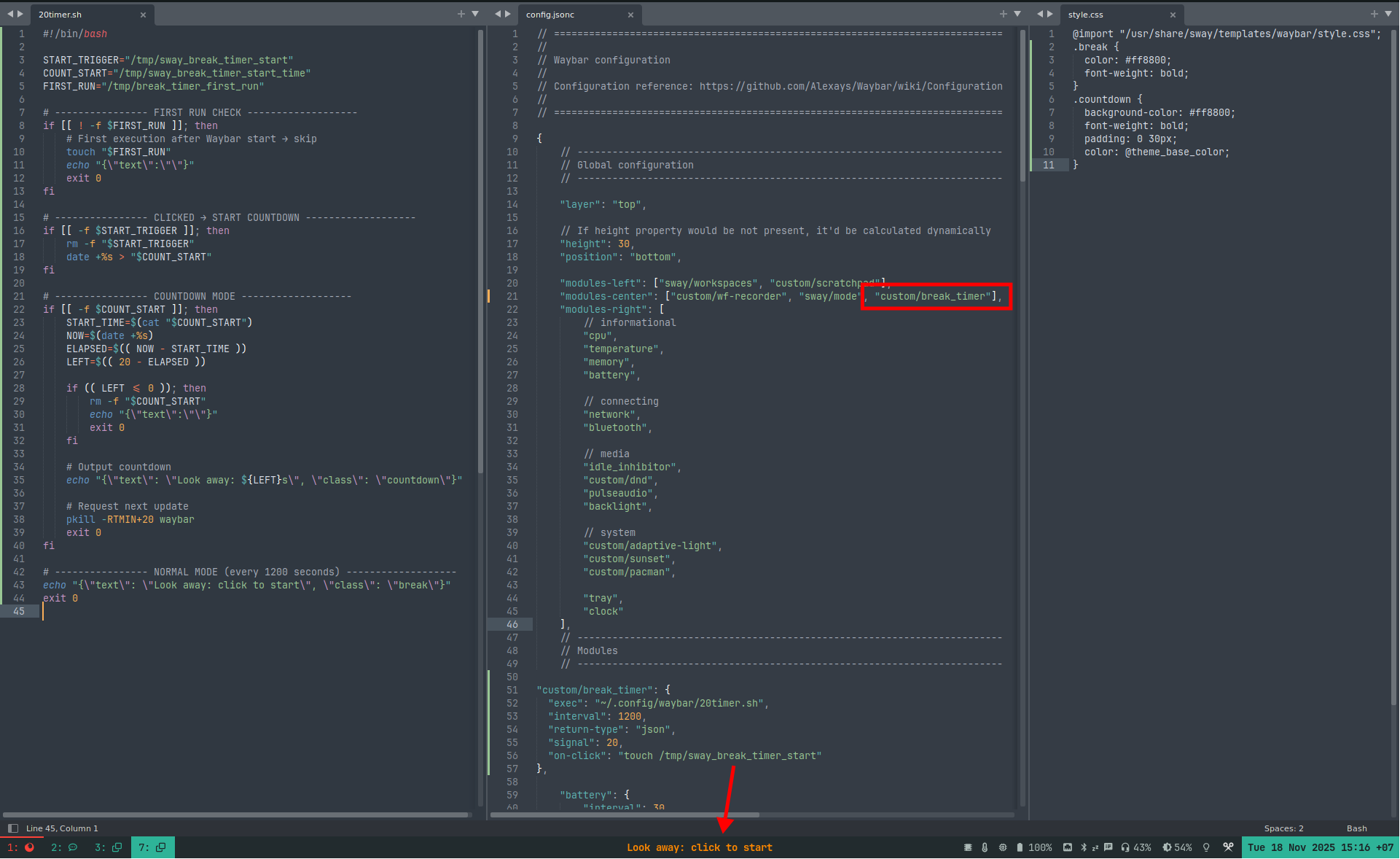
Sometimes I stare at the screen for too long, and forget to give my eyes a break. Especially when coding or reading a lot of small text the eye strain ends up being significant! To give my eyes a break I wrote this little bash script / waybar module to remind me to look away for 20 seconds every 20 minutes.


I uses 3 empty files in the /tmp/ folder to keep state. The tmp folder is deleted upon reboot, which resets the state and prevents it form showing the timer immediately on boot.
The Script
Let’s make a new file ~/.config/waybar/lookaway.sh and make it executable via chmod -x lookaway.sh
#!/bin/bash

START_TRIGGER="/tmp/sway_break_timer_start"
COUNT_START="/tmp/sway_break_timer_start_time"
FIRST_RUN="/tmp/break_timer_first_run"

# ---------------- FIRST RUN CHECK -------------------
if [[ ! -f $FIRST_RUN ]]; then
    # First execution after Waybar start → skip
    touch "$FIRST_RUN"
    echo "{\"text\":\"\"}"
    exit 0
fi

# ---------------- CLICKED → START COUNTDOWN -------------------
if [[ -f $START_TRIGGER ]]; then
    rm -f "$START_TRIGGER"
    date +%s > "$COUNT_START"
fi

# ---------------- COUNTDOWN MODE -------------------
if [[ -f $COUNT_START ]]; then
    START_TIME=$(cat "$COUNT_START")
    NOW=$(date +%s)
    ELAPSED=$(( NOW - START_TIME ))
    LEFT=$(( 20 - ELAPSED ))

    if (( LEFT <= 0 )); then
        rm -f "$COUNT_START"
        echo "{\"text\":\"\"}"
        exit 0
    fi

    # Output countdown
    echo "{\"text\": \"Look away: ${LEFT}s\", \"class\": \"countdown\"}"

    # Request next update
    pkill -RTMIN+20 waybar
    exit 0
fi

# ---------------- NORMAL MODE (every 1200 seconds) -------------------
echo "{\"text\": \"Look away: click to start\", \"class\": \"break\"}"
exit 0
Waybar ~/.config/waybar/config.jsonc
Now we can add the bash script as a module in your Waybar config file.
You can change the interval in the config.jsonc to the amount of seconds you want to be warned, “interval”: 1200, is 20 minutes.
~/.config/waybar/config.jsonc
// -------------------------------------------------------------------------
// Modules
// -------------------------------------------------------------------------

"custom/break_timer": {
  "exec": "~/.config/waybar/lookaway.sh",
  "interval": 1200,
  "return-type": "json",
  "signal": 20,
  "on-click": "touch /tmp/sway_break_timer_start"
}
In the same ~/.config/waybar/config.jsonc config file add the new break_timer module to a display location, for example in the center part of the waybar:
"modules-center": ["custom/break_timer"],Styling via ~/.config/waybar/style.cs
I also added some CSS to style it, in ~/.config/waybar/style.css
@import "/usr/share/sway/templates/waybar/style.css";

.break {
  color: #ff8800;
  font-weight: bold;
}
.countdown {
  background-color: #ff8800;
  font-weight: bold;
  padding: 0 30px;
  color: @theme_base_color;
}
I found this website by searching “remove ‘includes paid promotion’ from thumbnails” and it appears I have found hidden gold. I’m bookmarking this site now. I used to use Linux a ton but ultimately surrendered to my Windows overlords due to compatibility issues. It seems things have improved lately though so I might have to give it another try. I didn’t know you could customize Waybar with CSS — that’s lit. Thanks for posting!